Gadgets

iOS 7 beta 4

Apple has released iOS 7 beta 4. This one took 3 weeks. Either the developer site hacking incident disrupted the release or they’ve shifted to a longer release cycle as the beta stabilizes. It certainly looks like the latter to me. Stability and battery life were already good with the previous beta 3 and didn’t look like it changed much with beta 4. Most of the obvious changes were UI tweaks. Unfortunately they still haven’t fixed the Safari and Settings icons :P

At this rate, there’s probably going to be one or two more betas before the golden master and then the final around September or October… Along with the new iPhone. Or iPhones since a budget iPhone is rumored to be in the works.
iOS 7 beta 3

Apple has released iOS 7 beta 3 to developers. Looks like it’s gonna be a 2-week cycle. The most visible change is the system font: thicker and more readable. Most importantly, it’s much more stable now. Haven’t experienced a crash or reboot since installing yesterday. Good going Apple!

iOS 7 beta 2

Apple has released iOS 7 beta 2. It feels much snappier. But more importantly battery life has vastly improved. Used to last half a day. Now it can last the whole day. Apps are less stable and prone to crash though.

iOS 7 beta

As expected iOS 7 was announced at WWDC and as usual, I grabbed the beta as soon as it became available. IOS 7 is supposed to be biggest change since the original iPhone. Indeed there were some big changes:
  1. New Look – the biggest and most discussed change, the “flatter” interface; Skeumorphism is out, simple and modern is in. Reminds me of Android Jelly Bean and Windows Phone 8. Colors are generally flat and simple, icons and text are generally slim and crisp taking full advantage of the Retina display. Generally because the application is not consistent. Looks like the style guide is not yet in place.
  2. Notification Center – updated with today, all notifications, and missed notifications. And no, the today view is not something Google Now innovated :P Still no swipe to dismiss.
  3. Control Center – a pull up tab with quick access to system settings for Airplane Mode, WiFi, Bluetooth, Do Not Disturb Mode, Orientation Lock, and brightness. It also has the media player controls and shortcuts for some apps (flashlight, clock, calculator, and camera).
  4. Folders – animated unless it’s on the dock. Also folder now have multiple pages just like the home screen.
  5. Multitasking – improved process list with screen preview of process. You can swipe up on the previews to close apps. Supposedly, apps can actually run on the background when the phone is awake.
  6. Settings – fugly icon, new interface that reminds me of Android Jelly Bean
  7. Safari – fugly icon, new interface, smart address/search bar, tabs no longer limited to 8. You can swipe left to close tabs.
  8. Camera – new interface, swipe left and right to choose between video, camera, square (think Instagram complete with filters), and panorama.
  9. Photos – new interface, new filing system (years, collections, moments)
  10. Siri – enhanced capabilities such as adjusting system settings and new data sources
  11. Flickr and Vimeo Intgration – similar to Twitter and Facebook integration.

Overall, I like where iOS is heading. But this beta is the roughest (and most sluggish) one I’ve ever tried. That’s not a good sign.

JBL Micro Wireless

jbl-micro-wireless

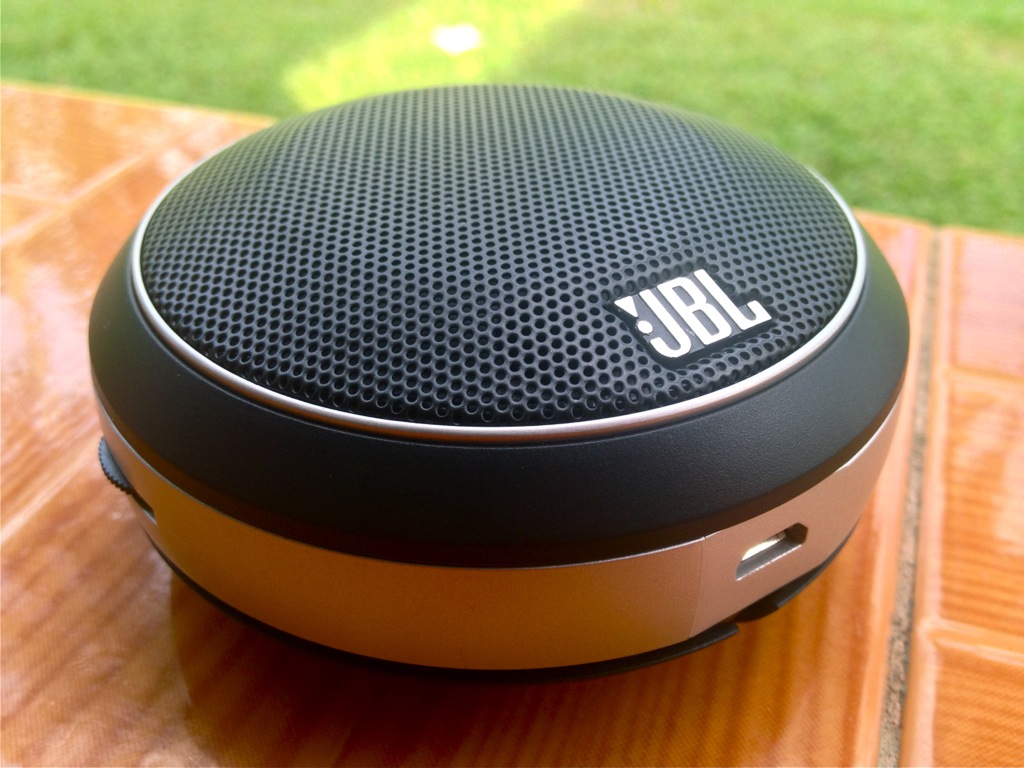
In preparation for the Hundred Island trip, I got a JBL Micro Wireless mobile speaker. It’s a small UFO-shaped speaker. The speaker grille is black and body is silver which makes it, from an aesthetic perspective, compatible with most mobile devices. It looks great whether beside my MacBook Pro, my black iPhone 4S, or even Jeanne’s iPad mini rugged OtterBox armor and all. Under the speaker grille is a status LED which glows blue when powered on, blinks blue during pairing, and glows red when low on power.

Along the silver body you will find a power/Bluetooth pairing button, volume dial, a micro USB port, and a 3.5mm audio output port. A short cable for a 3.5mm plug is discreetly wrapped around the body and the 3.5mm plug itself is nestled in cutouts at the bottom. Very elegant as you can see in the photo.

Read More